

Filtering the list, opening a call's details, advanced analysis and transcript, then exporting by email
Tabs
Logs has three tabs, one per kind of conversation. Pick yours:Phone
Outbound, inbound and web calls, at
/logs. The rest of this page.Chats, at
/logs/whatsapp, with their own columns, filters and export.Workflows
One row per workflow run, at
/logs/runs, with the path each run took.The call list
The list shows 100 rows per page and refreshes every 15 seconds. Click the Called on, Duration or Cost header to sort.
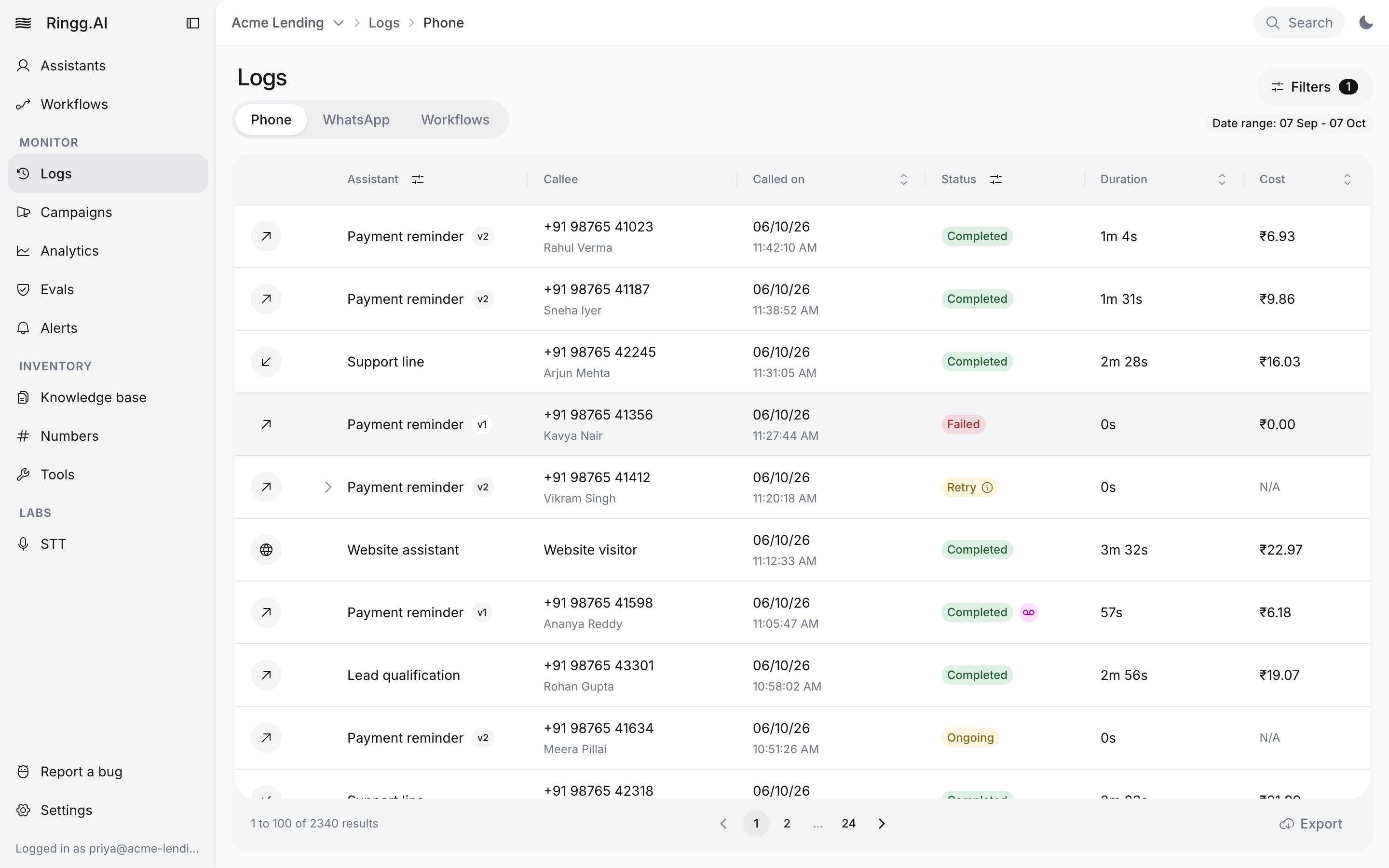
The Phone tab of Logs
Filter the list
Click Filters. Each applied filter appears as a chip next to the button; click a chip to change it, or its × to remove it. Reset clears everything. The funnel icons in the Assistant and Status headers open the same panel.Date range limits
- Dates more than 2 months before today are greyed out.
- A range picked on the calendar spans at most 60 days. A longer pick keeps the end date and moves the start.
- Call ID, From number, To number and Campaigns ignore the date range, so they find the call however old it is.
Custom variables and Advanced analysis
Both need exactly one assistant selected: with none, the panel says “Select an assistant first to use this filter.”; with several, “Select only one assistant to use this filter.” The keys offered depend on the selected agent. Build a condition from a key, an operator and a value, for examplecallee_name contains Sharma, and combine several with AND (the default) or OR. Changing the selected assistant clears them.
For Custom variables, a Value type menu on the condition (String, Number, Boolean) sets how the value is compared, so
false can be matched as a Boolean rather than the text "false". Advanced analysis keys have no type menu.
Call statuses
Calls reach Logs from campaigns, workflows, API calls, inbound numbers and tests. These call statuses are separate from campaign statuses.
The API also returns
forwarded: an inbound call sent to a transfer number instead of the agent, because the caller exceeded the agent’s inbound rate limit with the action Transfer Call. Busy and no answer are not statuses; they lead to Retry, or to Failed once retries run out.
WhatsApp chats use only Ongoing, Completed and Failed.
Call types
The call panel
Click a row to open the call. On a wide screen it opens beside the list; on a narrower one, as a drawer. The header shows the agent (click it to open the agent), the call ID with a copy button, the status, Next attempt for queued calls, From, Cost, and Origin: Campaign (campaigns) or API (Initiate a call). WhatsApp chats show Channel WhatsApp instead of Origin. Below it is the recording: play or pause, change speed (1x, 1.5x, 2x), and Download recording (call-recording-<call ID>.mp3). The transcript follows the playback, and clicking a transcript line seeks the recording to it. If there is no recording, the panel says “Call recording is not available.”, or “Call recording has been deleted as per the data purge policy.” once it has been purged.
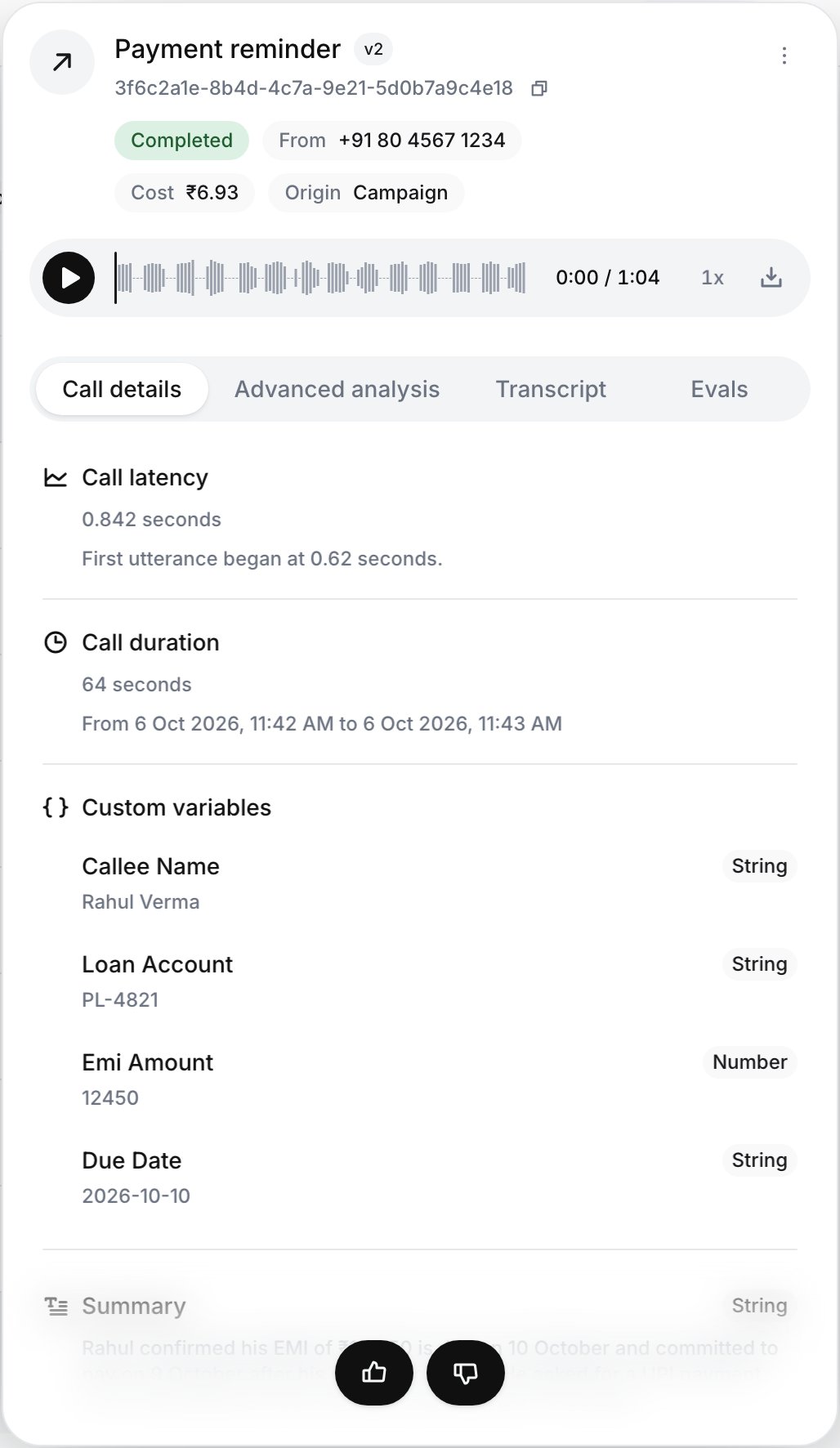
The call panel on the Call details tab
Click a tool or a node divider in the transcript to open its log: the HTTP status and latency (for API tools), when it ran, and Request, Response or Error tabs. Copy tool log copies the full log as JSON.
General analysis
The bottom of Call details lists Ringg’s built-in analysis of the call as key-value rows: the summary, key points, action items, classification, sentiment with its reason, whether the caller asked for a callback and when, and the disconnect reason. Until it is ready the tab says “General analysis is currently under process!”. Webhooks deliver the built-in analysis asplatform_analysis (payloads), and so does the API.
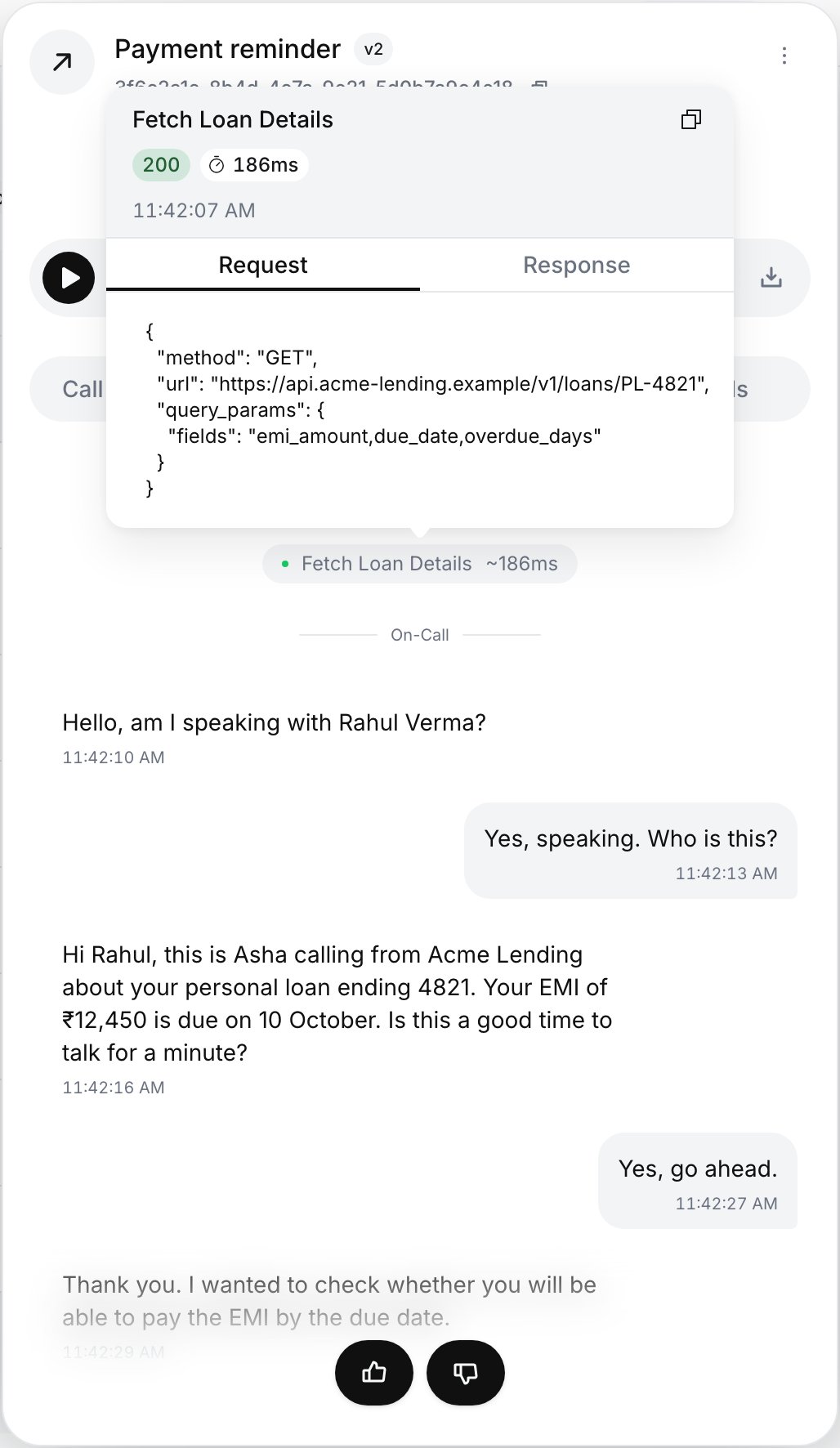
A tool call opened from the transcript
- Test this agent: opens the agent in test mode on the same channel, prefilled with this call’s name, number and variables (Test an agent).
- Download analysis: the analysis as JSON (
call-analysis-<call ID>.json). - Copy transcript and Download transcript (a
.txtfile).
Give feedback
On a Completed call, use the thumbs at the bottom of the panel to mark it good or bad. A thumbs-down opens a box (“Tell us what felt off”) for a comment. Your rating then shows under Your feedback.Link to a call
The URL carries the filters and the open call, so you can bookmark or share it.
Figures in Analytics also open Logs with matching filters.
WhatsApp chats
The WhatsApp tab (/logs/whatsapp) lists chats of your WhatsApp agents and works like the Phone tab, minus audio, cost, feedback and evals.
Finding, reading and exporting WhatsApp chats in Logs
- Columns: Assistant (with a version chip), Contact (the customer’s number; the name is the
namecustom variable, otherwise their WhatsApp profile name), Started on, Status (Ongoing, Completed, Failed) and Duration. A chat stays Ongoing until it closes, which can be hours after the last message (why). - Filters: date range, WhatsApp agents, chat status, From number (the customer), To number (your business number) and Chat ID, for example a webhook’s
chat_id. - The chat panel: Chat details (duration, custom variables, platform analysis), Advanced analysis, and Transcript, where tool calls and template sends appear as pills you can open for their request and response.
- Export: the same Export menu as calls. The emailed zip holds
chat_history_report.csv, one row per chat, up to 200,000 chats; the link is valid for 7 days. It includesTo Number(your number’s Meta phone number ID),External Chat IDand the transcript asspeaker: textlines.
Workflow runs
The Workflows tab lists one row per workflow run, 25 per page, with columns Status, Workflow, Callee, Calls, Started and Last update. Filter from the Status header (Running, Completed, Failed, Cancelled) and the Workflow header.- Click a row to open its path: the canvas with the steps it took. Click a step to see its status and, for a Condition, the Branch taken. A call step opens that call’s details and transcript. A failed step shows the error.
- Click the number under Calls to open the Phone tab limited to that run. A banner reads “Calls placed by run …” with Back to workflows and Clear.
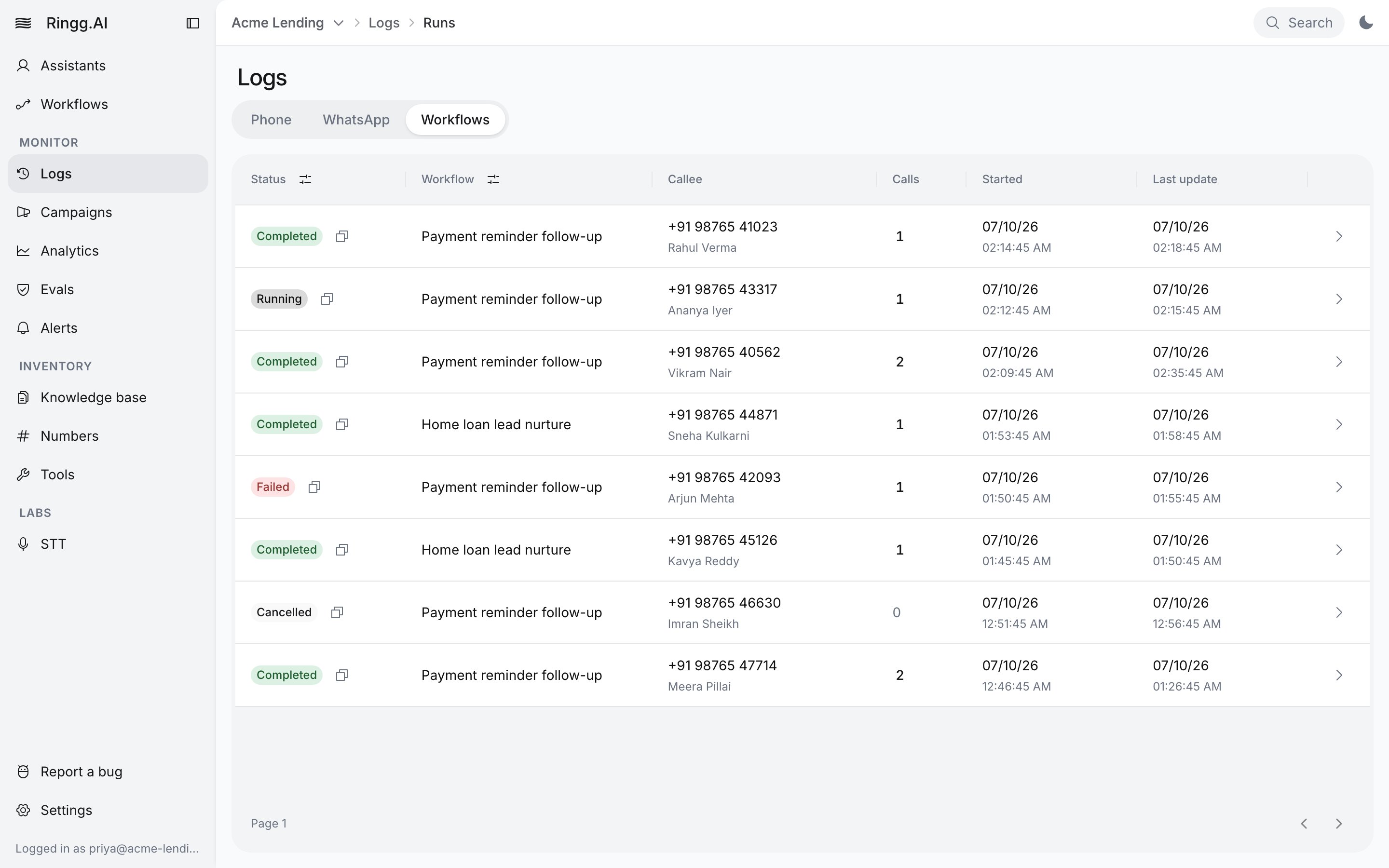
Logs → Workflows: one row per run
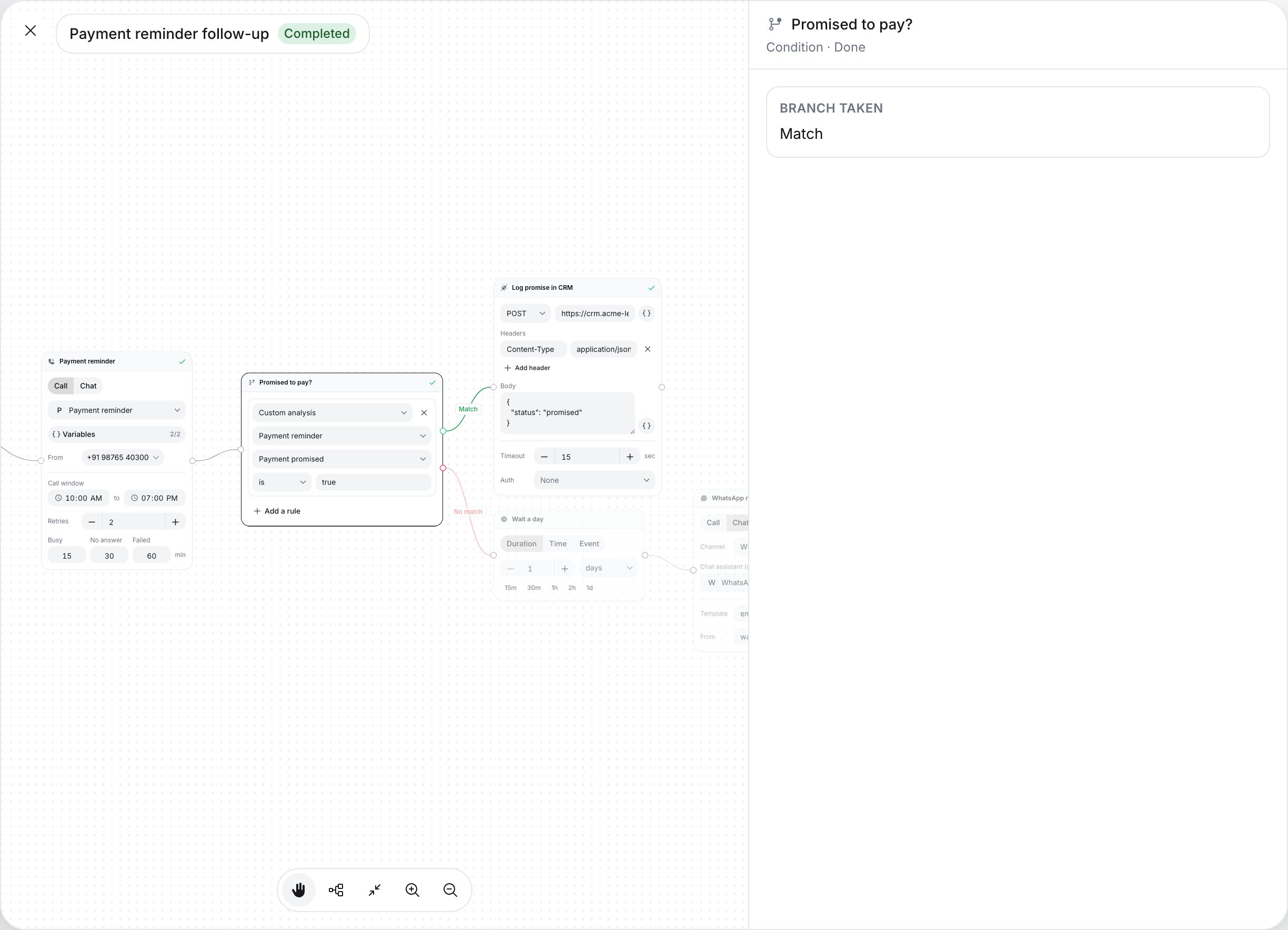
A run's path, with the branch a Conditional step took
Export
Click Export in the table footer and choose Export without analysis or Export with analysis. Nothing downloads: “Call history report (with the applied filters) is being sent to your email.” The export uses the filters on screen.With the API
You need an API key sent as
X-API-KEY (see Authentication).
GET /calling/history:
string (date-time)
Calls from this time, ISO 8601 with timezone, for example
2026-10-01T00:00:00+05:30.string (date-time)
Calls up to this time, same format.
string
One agent’s ID. See Find an agent’s ID.
string
One of
registered, ongoing, retry, error, completed, failed, cancelled, forwarded.string
A campaign’s ID, to list only its calls.
integer
default:"10"
Calls per page, at most 200. A larger value returns
400.integer
default:"0"
Calls to skip.
Troubleshooting
"No calls found" for a call you know exists
"No calls found" for a call you know exists
The call is probably outside the date range (the default is the last month). Search by Call ID, From number or To number, which ignore dates. Workflow calls appear only from the Workflows tab.
I can't pick a date older than 2 months
I can't pick a date older than 2 months
The calendar does not go further back. Use Call ID, a number or a campaign filter, or the Get call history API.
Custom variables and Advanced analysis are greyed out
Custom variables and Advanced analysis are greyed out
Select exactly one assistant under Assistants.
Export is missing
Export is missing
The list is limited to one workflow run. Click Clear on the banner first.
The feedback thumbs are not shown
The feedback thumbs are not shown
Feedback is available only on calls with status Completed, not on chats.
The recording says "deleted as per the data purge policy"
The recording says "deleted as per the data purge policy"
The recording was removed under a data purge policy set up for your workspace. Contact Ringg for its details. To keep recordings, use Download recording, or save the file from the
recording_url that Get call details returns. The link may expire; fetch a fresh one from Get call details. The dashboard shows campaign reports for 60 days after a campaign ends (Manage a campaign).Next steps
See trends in Analytics
Totals, connect rates and costs over time.
Score calls with Evals
Check call quality automatically.
Get alerted on a spike
Notify your team when a metric crosses a threshold.