

What this chapter covers
Before you start
An agent
A Webcall agent, or any voice agent. WhatsApp agents can’t be embedded.
Access to the page HTML
Or your tag manager.
Every visitor can read the snippet. It authenticates with the agent’s webcall public key (
authorization: "Bearer <key>"), which works only for that agent and only from the origins under Allowed clients. Every agent has a webcall key. If the page could not load it, the generated snippet shows xApiKey: "YOUR_API_KEY" instead; reload the page to get the key. Never fill that in with your workspace API key: it is not limited to one agent or to your domains, and anyone could copy it from the page.Components, Appearance and Install & domains
Install the widget
1
Allow your domains
In Install & domains, add each site under Allowed clients, for example
www.acme-lending.example and staging.acme-lending.example. Separate several entries with commas. A page whose origin is not on the list cannot start a conversation, which is the usual reason an embed works on staging and fails in production.2
Pick a CDN version
The version selector on the snippet lists every published version, newest first, and starts on the newest.
loadAgentsCdn("latest", …) resolves to the 1.0 line. Use it only while exploring, and ship an exact version you have tested.3
Copy the snippet
Click Copy and paste the code before the closing If no trigger button appears, check that the script and stylesheet loaded without console errors and that
</body> tag. The snippet already contains your agentId, the webcall key, the agent’s variables and any Appearance settings. It follows this pattern:Widget snippet
loadAgent runs inside the loadAgentsCdn callback.4
Allow the CDN in your CSP
If your site sends a Content Security Policy, allow
https://cdn.jsdelivr.net in script-src and style-src; to pin exact files, see CSP setup.The trigger button appears at the bottom right. Clicking it opens the start screen; starting a call asks for microphone permission, then connects to the agent. The call appears in Logs with call type Webcall.
Hand the install to Claude, Cursor or ChatGPT. Fill in the two placeholders first.
ringg_flutter package (mobile guide, Flutter view), then create the controller where your app starts. Replace clientOrigin with your real application ID and add the same string to Allowed clients (use ios:// for the iOS build).
Allowed clients
“Only these websites and apps can run your agent.” Each entry is an . Type an entry and press Enter or Add. Separate several entries with commas.https://www.ringg.aiis listed by default (tagged default) and cannot be removed.capacitor://localhost,ionic://localhostandfile://are tagged shared: every app built on that runtime presents the same origin, so allowing one admits all of them.- A bare host is saved as
https://<host>, soexample.combecomeshttps://example.com.www.example.comandexample.comare different origins; add both if your site answers on both. - Ports,
localhostand IP addresses are allowed, for examplehttp://localhost:3000. Wildcards (*.example.com) and paths are not. - Ringg checks each entry when you save. A rejected entry stays in the field with the reason underneath.
- Each change saves immediately (“Allowed clients updated successfully.”). Click × on an entry to remove it.
Appearance
Set the widget’s theme, size and branding before you copy the snippet. A live preview sits beside the settings on single-prompt agents. To style the widget further in code, see Configuration and Customization.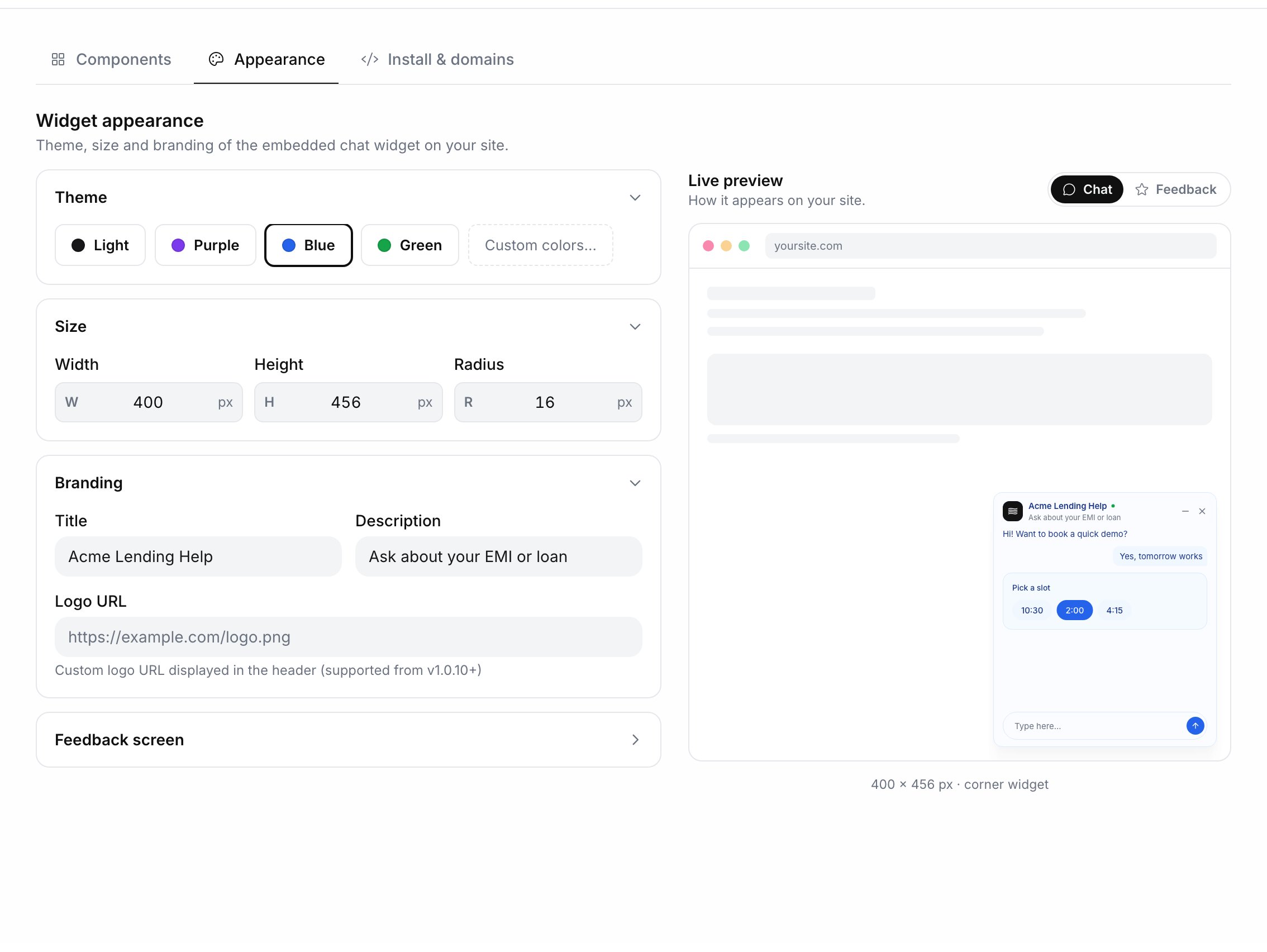
Appearance with the live preview
Common options
Pass these in theloadAgent object. The full list is in the configuration reference.
Rotate the webcall key
Click Rotate key above the snippet and confirm Rotate. The old key stops working immediately, so every live embed fails until you copy the new snippet and redeploy. Rotate when the key has been used from somewhere it shouldn’t have been, and schedule the redeploy for the same window.With the API
Edit Assistant sets Allowed clients withoperation: "edit_agent_whitelisted_domains" and the list of origins in whitelisted_domains. The list replaces the saved one, so send every origin each time. It must still include https://www.ringg.ai, or the request fails with 400 “Ringg.ai domain cannot be removed!” You need an API key and the agent ID.
cURL
Troubleshooting
The widget loads but will not connect
The widget loads but will not connect
The page’s origin is not in Allowed clients, and the start request fails with
403: Client '<origin>' is not allowed to initiate webcall! Please add it to the agent's allowed clients first. Add the exact origin, including staging sites. In a Flutter or React Native app, clientOrigin must match an entry exactly."Please enter a website or app"
"Please enter a website or app"
The field was empty when you clicked Add.
Next steps
Configure the widget
Panel copy, theme, trigger button, position and window size.
Listen for events
Send conversation starts, ends and ratings to your analytics.
Prepare for launch
Domains, CSP, version pinning and browser QA before production.