Add an API tool to a Ringg AI agent: call your own endpoint before, during or after a call, map parameters from variables or the conversation, and use the response in the prompt.
Adding a pre-call API tool and a call transfer tool
1
Open the phase
On the Tools page, pick Pre-call, On-call or Post-call, then click API in the side panel.
2
Name the request
Enter a tool name, the method (GET, POST, PUT, PATCH or DELETE) and your endpoint’s URL. The name is saved as lowercase letters, digits and underscores, so CRM Lookup becomes crm_lookup.
3
Add parameters
Fill the Headers, Path, Query and Body tabs. Each row has a key, a value and a source; a Static row also has a String, Number or Boolean type toggle. + Test value on a Variable, Dynamic or JQ row gives Test API a sample value.The body can be application/json, multipart/form-data or x-www-form-urlencoded. A JSON body has a Pretty form view and an Editor view: “Use @ to insert variables, # to create dynamic values, and `...` for jq expressions inside the JSON editor.” Copy cURL copies the request as a cURL command.
4
Test and shape the response
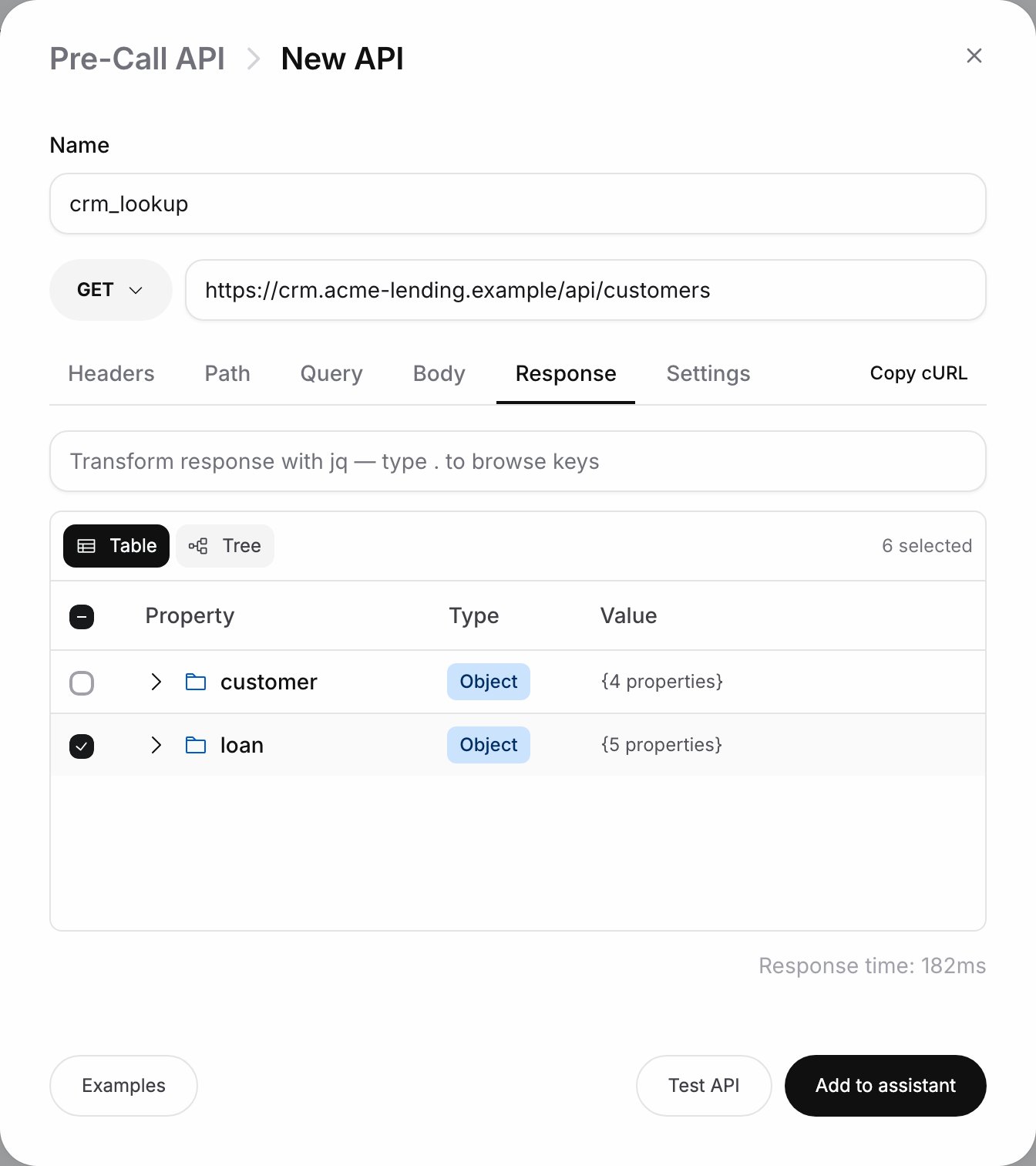
Click Test API. The Response tab then shows the result and response time (it is not offered for DELETE). Keep only what the agent needs: tick keys in the response, or write a jq transform. On-call outputs are read by the model, and long payloads slow it down.
The Response tab after Test API
5
Set behaviour and save
On the Settings tab, set the timeout and retries (Request settings). Click Add to assistant (Save tool when editing). For an on-call tool, mention it in the prompt.
The tool appears in the phase’s list on the Tools page.
An API tool’s menu has Enable or Disable, Share to workspace (Workspace tools) and Delete.
The call record: id, status, sub_status, call_type, call_category, to_number, from_number, call_duration, transcript, recording_url, retry_count, hangup_source, user_message_count and more. A pre-call tool gets the fields known when the call is set up, such as id, to_number, from_number, agent_id and retry_count, with call_duration at 0. An on-call tool also gets the transcript so far, call_duration and the message counts. call_cost, recording_url, hangup_source and call_category are filled only after the call.
A payment reminder agent for Acme Finance should know the amount due before it says hello.
1
Create the pre-call tool
On Pre-call, click API. Name it crm_lookup, method GET, URL https://crm.example.com/api/customers.
2
Pass the phone number
On Query, add a Variable row with key phone and value custom_args.mobile_number. On Headers, add a Static row Authorization with your CRM token.
3
Keep the useful fields
Click Test API. In Response, tick amount_due, due_date and rm_phone. Add 404 under Block call on status codes so no call goes out for an unknown customer.
4
Use the fields in the prompt
Save, then use the fields in the first message and script:
Hello @{{callee_name}}, this is Riya from Acme Finance. I'm calling about your EMI of ₹@((crm_lookup.amount_due)), due on @((crm_lookup.due_date)).If the caller disputes the amount, use @||call_transfer|| to reach their relationship manager.
A test call opens with the customer’s real amount and due date.
Set the call transfer Target to @((crm_lookup.rm_phone)) and each caller reaches their own manager.