

Objective
Define the three facts Acme wants from every reminder call as typed Advanced Analysis variables, mark the goal, and test them on a call you already made.The scenario
After the call, Acme’s collections team needs three things: did the customer promise to pay, by which date, and if not, why. Status, duration and transcript are already in Logs; these three are extracted from the transcript by Advanced Analysis after every conversation.payment_promised is the goal, so Analytics can report a success rate in part 6.
Hands-on
Adding a Boolean goal variable and testing it on a past call
1
Open Advanced Analysis
In Ananya’s editor, open Advanced Settings → Advanced Analysis and click Add a new variable. The Add variables dialog opens.
2
Add the goal
Set Variable name to
payment_promised and keep Type on Boolean. For Description, write the instruction “True if the customer agreed to pay by a specific date.” Set Default value to false and switch on Use as goal.3
Add the other two
Click Add new variable inside the dialog for each:
promised_date, type Date, description “The date the customer promised to pay, if any.”objection, type Enum, with the optionsalready_paid,no_money,disputeandnone(type each and press Enter), description “The customer’s main reason for not paying.”, default valuenone.
4
Add context and tool logs
Below the table, write in Context what counts as a promise: “A promise means the customer named a date, or said they would pay today.” Click Save: “Context saved”. Switch on Log tool calls so the analysis also sees what
crm_lookup returned.5
Test on your part 2 call
Click Test. In Test advanced analysis, pick the test call from part 2 under Or select from recent call log; picking it runs the test straight away. Analysis result appears next to Call transcript.
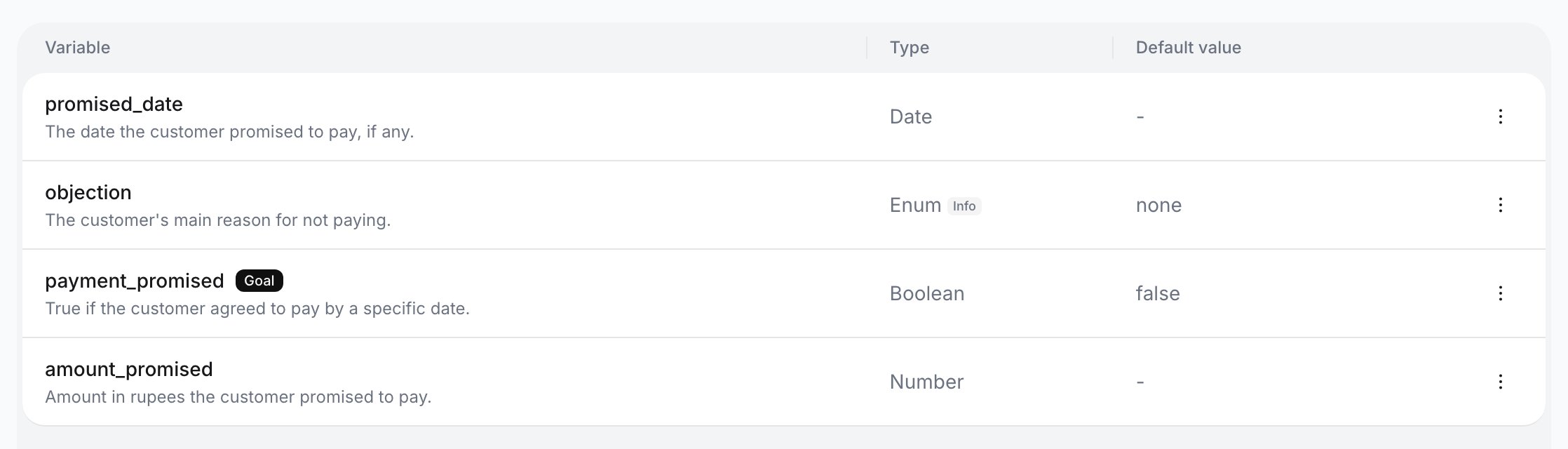
Variables after saving
Checkpoint
The table lists the three variables with their Type and Default value, and
payment_promised carries a Goal chip. In the test, Analysis result shows a value for each that matches what you said on the call: if you named a date, payment_promised is true and promised_date holds it.Exercise
Addamount_promised as a Number with the description “The amount in rupees the customer said they would pay.” and the default value 0, then click Test on the same call. Expected result: a fourth row in the table and a fourth line in Analysis result, reading 0 if you named no amount on the call.
What you learned
- Advanced Analysis variables are filled from the transcript after the call; custom variables are filled before it. They are separate lists.
- Only a Boolean can be the goal, and an agent has one at a time. Analytics’ Goal achieved comes from it.
- Results appear in the call’s Advanced analysis tab in Logs, in Logs filters, Analytics cohorts, post-call tools, alerts and the
client_analysis_completedwebhook, which the capstone uses to hand them to the CRM.