> ## Documentation Index
> Fetch the complete documentation index at: https://docs.ringg.ai/llms.txt
> Use this file to discover all available pages before exploring further.
# Ringg AI MCP Server
> Use Ringg AI from Claude, ChatGPT, Cursor, Claude Code or any MCP client: place calls, manage assistants and read transcripts in plain language.
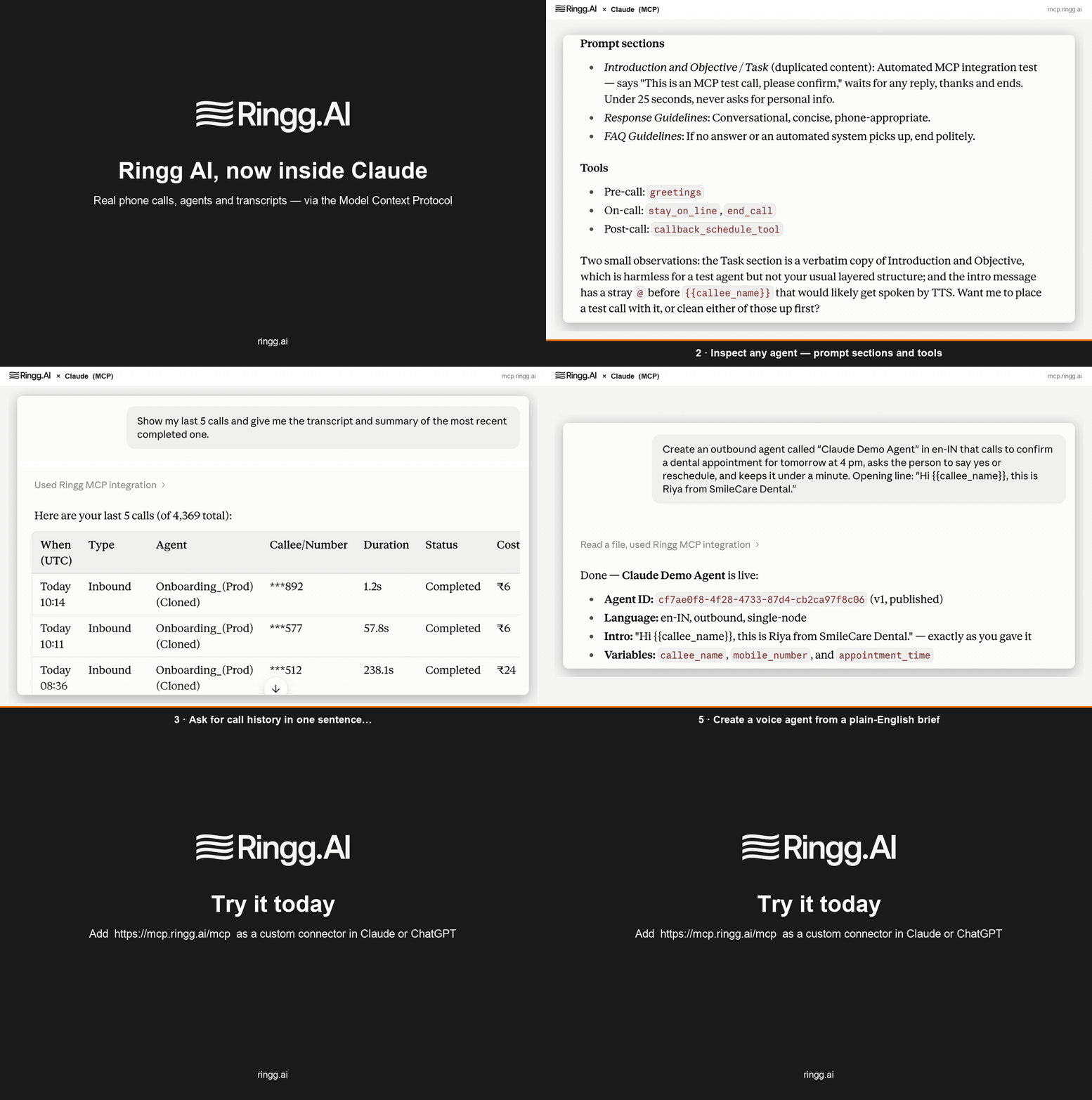
The Ringg AI MCP server lets AI assistants operate your Ringg workspace directly. Connect it once and you can say things like *"call this number with my appointment agent and tell me what they said"* — the assistant places the call, waits for it to finish and reads you the transcript.
It is built on the open [Model Context Protocol](https://modelcontextprotocol.io) (MCP), so it works with every client that speaks MCP over HTTP.
 ## Server URL
```text theme={null}
https://mcp.ringg.ai/mcp
```
Transport: Streamable HTTP. Authentication: OAuth 2.1 (sign in with your workspace API key once) or a bearer API key — see [Connect a client](/mcp/connect).
## What the assistant can do
| Capability | Tools |
| -------------------------- | ---------------------------------------------------------------------------------------------------------- |
| Understand the workspace | `get_account_overview` — assistants, phone numbers, credits, last-30-day metrics and a ready-to-call check |
| Place and follow calls | `place_call`, `get_call` (waits until the call ends and returns transcript, recording and analysis) |
| Browse history and metrics | `list_calls`, `get_call_analytics` |
| Manage assistants | `list_agents`, `get_agent`, `create_agent`, `update_agent`, `list_voices` |
Every tool returns structured data the model can reason over, and errors say what to do next (for example, which caller IDs are usable when one is missing). The server also exposes **resources** (`ringg://workspace`, `ringg://agents`, `ringg://voices`, `ringg://calls/{id}/transcript`) and ready-made **prompts** for common workflows. See the [tool reference](/mcp/tools).
## Quick start
In the Ringg dashboard open **Settings → API Key** and generate a key (owner only). Keep it private — the MCP server never shares it with the client you connect. Details: [Authentication](/api-reference/quick-start/authentication).
In Claude or ChatGPT add `https://mcp.ringg.ai/mcp` as a custom connector, then click **Connect**. A Ringg page opens; paste your key once. Developer tools such as Claude Code and Cursor can skip the sign-in and send the key as a bearer token. Step-by-step: [Connect a client](/mcp/connect).
Start with *"What's in my Ringg AI workspace? Am I ready to place calls?"* The assistant reports assistants, numbers and credits, and suggests the exact call to try next.
`place_call` dials a real phone number and consumes credits. It is flagged as a destructive action, so well-behaved clients ask you to confirm before dialling. Always confirm the number and purpose with the person asking.
## Example conversations
* *"List my voice assistants and show me the full configuration of the appointment one."*
* *"Create an outbound assistant in Hindi that reminds customers their order is ready for pickup and asks whether they'll collect it today or tomorrow."*
* *"Call +91… with it, callee name Priya, order\_id 4821 — wait for the call and summarise what she said."*
* *"How did calling go this week? Connection rate, average duration, and the three most common reasons calls failed."*
## Limits and behaviour
* Calls are subject to your workspace's normal rules: DND, calling hours, credits and caller-ID availability. Ringg test numbers cannot place live calls; the assistant is told which numbers are usable.
* Access tokens issued to connectors expire after one hour and refresh automatically; a connector stays signed in for 30 days of inactivity before it must reconnect.
* Requests are rate limited per client to protect the platform. Normal assistant usage never approaches the limits.
* Phone numbers in tool results may be masked according to your workspace's privacy settings.
## Next steps
Claude, ChatGPT, Claude Code, Cursor and other MCP clients.
Every tool, resource and prompt with its inputs and outputs.
How sign-in works, what is stored, how to revoke access.
## Server URL
```text theme={null}
https://mcp.ringg.ai/mcp
```
Transport: Streamable HTTP. Authentication: OAuth 2.1 (sign in with your workspace API key once) or a bearer API key — see [Connect a client](/mcp/connect).
## What the assistant can do
| Capability | Tools |
| -------------------------- | ---------------------------------------------------------------------------------------------------------- |
| Understand the workspace | `get_account_overview` — assistants, phone numbers, credits, last-30-day metrics and a ready-to-call check |
| Place and follow calls | `place_call`, `get_call` (waits until the call ends and returns transcript, recording and analysis) |
| Browse history and metrics | `list_calls`, `get_call_analytics` |
| Manage assistants | `list_agents`, `get_agent`, `create_agent`, `update_agent`, `list_voices` |
Every tool returns structured data the model can reason over, and errors say what to do next (for example, which caller IDs are usable when one is missing). The server also exposes **resources** (`ringg://workspace`, `ringg://agents`, `ringg://voices`, `ringg://calls/{id}/transcript`) and ready-made **prompts** for common workflows. See the [tool reference](/mcp/tools).
## Quick start
In the Ringg dashboard open **Settings → API Key** and generate a key (owner only). Keep it private — the MCP server never shares it with the client you connect. Details: [Authentication](/api-reference/quick-start/authentication).
In Claude or ChatGPT add `https://mcp.ringg.ai/mcp` as a custom connector, then click **Connect**. A Ringg page opens; paste your key once. Developer tools such as Claude Code and Cursor can skip the sign-in and send the key as a bearer token. Step-by-step: [Connect a client](/mcp/connect).
Start with *"What's in my Ringg AI workspace? Am I ready to place calls?"* The assistant reports assistants, numbers and credits, and suggests the exact call to try next.
`place_call` dials a real phone number and consumes credits. It is flagged as a destructive action, so well-behaved clients ask you to confirm before dialling. Always confirm the number and purpose with the person asking.
## Example conversations
* *"List my voice assistants and show me the full configuration of the appointment one."*
* *"Create an outbound assistant in Hindi that reminds customers their order is ready for pickup and asks whether they'll collect it today or tomorrow."*
* *"Call +91… with it, callee name Priya, order\_id 4821 — wait for the call and summarise what she said."*
* *"How did calling go this week? Connection rate, average duration, and the three most common reasons calls failed."*
## Limits and behaviour
* Calls are subject to your workspace's normal rules: DND, calling hours, credits and caller-ID availability. Ringg test numbers cannot place live calls; the assistant is told which numbers are usable.
* Access tokens issued to connectors expire after one hour and refresh automatically; a connector stays signed in for 30 days of inactivity before it must reconnect.
* Requests are rate limited per client to protect the platform. Normal assistant usage never approaches the limits.
* Phone numbers in tool results may be masked according to your workspace's privacy settings.
## Next steps
Claude, ChatGPT, Claude Code, Cursor and other MCP clients.
Every tool, resource and prompt with its inputs and outputs.
How sign-in works, what is stored, how to revoke access.