> ## Documentation Index
> Fetch the complete documentation index at: https://docs.ringg.ai/llms.txt
> Use this file to discover all available pages before exploring further.
> ## Agent Instructions
> To search or read these docs, connect the Ringg docs MCP server at https://docs.ringg.ai/mcp (no key needed; tools search_ringg_ai and query_docs_filesystem_ringg_ai) instead of browsing pages one by one. Setup for each client: https://docs.ringg.ai/resources/mcp-server/docs-mcp-server/mcp-for-ai-assistants.md
> The dashboard labels agents "Assistants"; these docs say "agent". Both mean the same object, identified by agent_id.
> API base URL: https://prod-api.ringg.ai/ca/api/v0. Send the workspace API key in the X-API-KEY header, from server-side code only.
> Placing a call dials a real phone number and spends credits. Confirm the number with the user before calling.
> To act on a Ringg workspace (place calls, edit agents, read transcripts), use the separate Ringg workspace MCP server at https://mcp.ringg.ai/mcp: https://docs.ringg.ai/resources/mcp-server/workspace-mcp-server/overview.md
# API tools
> Add an API tool to a Ringg AI agent: call your own endpoint before, during or after a call, map parameters from variables or the conversation, and use the response in the prompt.
## Add an API tool
On the **Tools** page, pick **Pre-call**, **On-call** or **Post-call**, then click **API** in the side panel.
Enter a tool name, the method (**GET**, **POST**, **PUT**, **PATCH** or **DELETE**) and your endpoint's URL. The name is saved as lowercase letters, digits and underscores, so `CRM Lookup` becomes `crm_lookup`.
Fill the **Headers**, **Path**, **Query** and **Body** tabs. Each row has a key, a value and a [source](#parameter-sources); a **Static** row also has a **String**, **Number** or **Boolean** type toggle. **+ Test value** on a Variable, Dynamic or JQ row gives **Test API** a sample value.
The body can be `application/json`, `multipart/form-data` or `x-www-form-urlencoded`. A JSON body has a **Pretty** form view and an **Editor** view: "Use `@` to insert variables, `#` to create dynamic values, and `` `...` `` for jq expressions inside the JSON editor." **Copy cURL** copies the request as a cURL command.
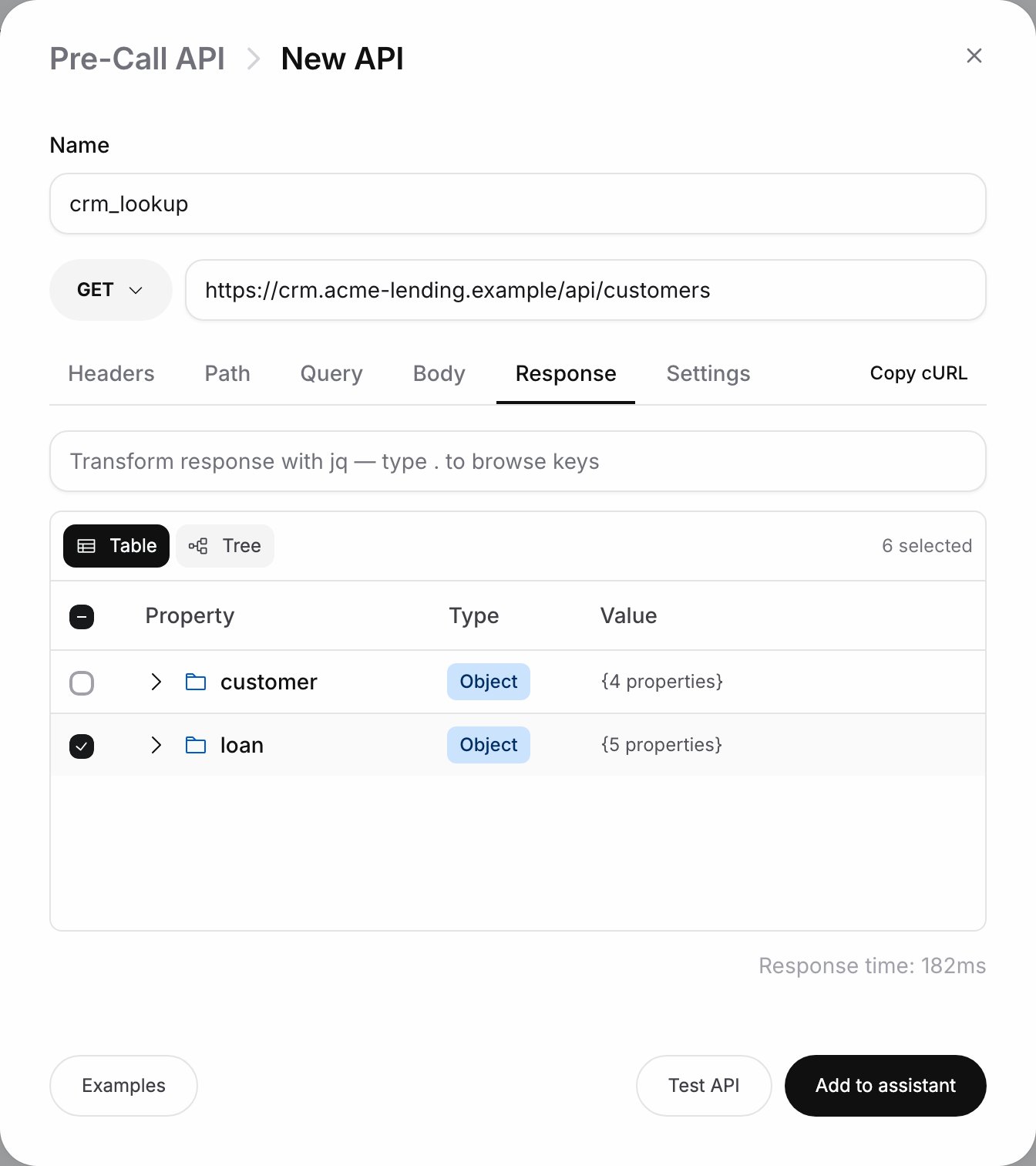
Click **Test API**. The **Response** tab then shows the result and response time (it is not offered for DELETE). Keep only what the agent needs: tick keys in the response, or write a jq transform. On-call outputs are read by the model, and long payloads slow it down.
On the **Settings** tab, set the timeout and retries ([Request settings](#request-settings)). Click **Add to assistant** (**Save tool** when editing). For an on-call tool, [mention it in the prompt](/documentation/build-agents/customize-agent-behaviour/tools/overview#use-on-call-tools-in-the-prompt).
The tool appears in the phase's list on the **Tools** page.
An API tool's menu has **Enable** or **Disable**, **Share to workspace** ([Workspace tools](/documentation/build-agents/customize-agent-behaviour/tools/workspace-tools#workspace-tools)) and **Delete**.
### Parameter sources
| Source | Value | Phases |
| - | - | - |
| **Static** | A fixed value, such as an auth header | All |
| **Variable** | A value from the call context, picked from a list | All |
| **Dynamic** | Filled by the agent from the conversation; describe it, such as "Order ID the caller reads out" | On-call |
| **JQ** | A jq expression over the call context | All |
The call context has these groups:
The agent's [custom variables](/documentation/build-agents/customize-agent-behaviour/custom-variables), such as `callee_name` and `mobile_number`.
The call record: `id`, `status`, `sub_status`, `call_type`, `call_category`, `to_number`, `from_number`, `call_duration`, `transcript`, `recording_url`, `retry_count`, `hangup_source`, `user_message_count` and more. A pre-call tool gets the fields known when the call is set up, such as `id`, `to_number`, `from_number`, `agent_id` and `retry_count`, with `call_duration` at `0`. An on-call tool also gets the transcript so far, `call_duration` and the message counts. `call_cost`, `recording_url`, `hangup_source` and `call_category` are filled only after the call.
Fields another tool returned, as `tool_name.field`.
Post-call only. Ringg's analysis: `summary`, `classification`, `key_points`, `action_items`, `callback_requested`, `callback_requested_time` and more ([Analysis fields](/documentation/build-agents/customize-agent-behaviour/webhooks/field-reference#analysis-fields)).
Post-call only. Your [Advanced Analysis](/documentation/build-agents/customize-agent-behaviour/advanced-analysis) variables.
In jq, the same groups are `.custom_args`, `.call_data`, `.api_responses.` (or `.tool_outputs`), `.platform_analysis` and `.client_analysis`.
### Request settings
| Setting | Values |
| - | - |
| **Timeout (seconds)** | Max waiting time for the API's response, per attempt. Empty means 60 seconds. |
| **Retry count** | 0 to 10. Retries on timeouts, connection errors, `429`, `500`, `502`, `503` and `504`. Other statuses, such as `404`, are never retried. |
| **Backoff** | Shown when retries are above 0. **Exponential** (default), **Linear** or **Constant**, with **Initial delay (ms)** (default 500) and **Max delay (ms)** (default 5000). |
| **Block call on status codes** | Pre-call only. Codes from 400 to 599 that abort the whole call; other 4xx and 5xx only skip this tool's data. |
| **Trigger on unanswered calls** | Post-call only, off by default. Runs the tool when the call isn't picked up, as long as an attempt was made. |
| **Tool Execution Message** | On-call only. Spoken when the tool triggers, one per [agent language](/documentation/build-agents/customize-agent-behaviour/voice-and-language#languages). Empty means silent. |
## Example: look up the customer before the call
A payment reminder agent for Acme Finance should know the amount due before it says hello.
On **Pre-call**, click **API**. Name it `crm_lookup`, method **GET**, URL `https://crm.example.com/api/customers`.
On **Query**, add a **Variable** row with key `phone` and value `custom_args.mobile_number`. On **Headers**, add a **Static** row `Authorization` with your CRM token.
Click **Test API**. In **Response**, tick `amount_due`, `due_date` and `rm_phone`. Add `404` under **Block call on status codes** so no call goes out for an unknown customer.
Save, then use the fields in the first message and script:
```text theme={null}
Hello @{{callee_name}}, this is Riya from Acme Finance. I'm calling about your EMI of ₹@((crm_lookup.amount_due)), due on @((crm_lookup.due_date)).
If the caller disputes the amount, use @||call_transfer|| to reach their relationship manager.
```
A [test call](/documentation/build-agents/test-and-improve/test-an-agent) opens with the customer's real amount and due date.
Set the call transfer **Target** to `@((crm_lookup.rm_phone))` and each caller reaches their own manager.
This documentation is built and hosted on [Mintlify](https://mintlify.com), a developer documentation platform.