> ## Documentation Index
> Fetch the complete documentation index at: https://docs.ringg.ai/llms.txt
> Use this file to discover all available pages before exploring further.
> ## Agent Instructions
> To search or read these docs, connect the Ringg docs MCP server at https://docs.ringg.ai/mcp (no key needed; tools search_ringg_ai and query_docs_filesystem_ringg_ai) instead of browsing pages one by one. Setup for each client: https://docs.ringg.ai/resources/mcp-server/docs-mcp-server/mcp-for-ai-assistants.md
> The dashboard labels agents "Assistants"; these docs say "agent". Both mean the same object, identified by agent_id.
> API base URL: https://prod-api.ringg.ai/ca/api/v0. Send the workspace API key in the X-API-KEY header, from server-side code only.
> Placing a call dials a real phone number and spends credits. Confirm the number with the user before calling.
> To act on a Ringg workspace (place calls, edit agents, read transcripts), use the separate Ringg workspace MCP server at https://mcp.ringg.ai/mcp: https://docs.ringg.ai/resources/mcp-server/workspace-mcp-server/overview.md
# Call settings
> Set an agent's call duration, inactivity timeouts, calling window, voicemail handling, interruption sensitivity, rate limits and chat session timeouts in Ringg AI.
In the dashboard: Agents (listed under **Assistants** in the sidebar) → open an agent → **Call Settings → Call** or **Chat**. On a [multi-prompt agent](/documentation/build-agents/agents/multi-prompt-agents/overview) it is **Global Settings → Call** or **Chat**; on a [WhatsApp agent](/documentation/build-agents/agents/whatsapp-agents/create-an-agent), **Calls → Settings** and **Chat → Settings**.
Switches and menus save as soon as you change them. **Noise Suppression Level** and **Exit Timing** save when you leave the field or press Enter. **Custom message**, **Exit Message** and the rate-limit fields have their own **Save** button.
This chapter is the settings around the prompt and what comes out of each conversation:
| Page | What you set |
| - | - |
| Call settings (this page) | Duration, inactivity timeouts, calling window, voicemail, interruption sensitivity, rate limits and chat session timeouts |
| [Advanced Analysis](/documentation/build-agents/customize-agent-behaviour/advanced-analysis) | The typed variables Ringg extracts after each conversation, and the goal |
| [Event Subscription](/documentation/build-agents/customize-agent-behaviour/event-subscription) | The call, chat and analysis events Ringg sends to your server |
| [Webhooks](/documentation/build-agents/customize-agent-behaviour/webhooks/setup-and-errors), [Webhook payloads](/documentation/build-agents/customize-agent-behaviour/webhooks/call-events) | The endpoint side: subscribe by API, retries and errors, and the JSON for each call and chat event |
## Before you start
The agent whose call or chat behaviour you are setting.
Optional: needed only for **Maximum calls to one person**.
## Which sections an agent shows
On a single-prompt agent, the **Call** page depends on the [agent type](/documentation/build-agents/agents/agent-types#agent-types-by-channel). "Outbound" includes Outbound-Inbound agents.
| Section | Outbound | Inbound | Webcall, WhatsApp |
| - | - | - | - |
| Call limits | Yes | No | No |
| Call duration | Yes | Yes | Yes |
| Calling window | Yes | No | No |
| Voicemail | Yes | Yes | No |
| Rate Limiting | No | Yes | No |
| Interruption sensitivity | Yes | Yes | Yes |
| Other settings | Yes | Yes | Yes |
Every multi-prompt agent shows the outbound set (no Rate Limiting), in a compact list without section headings or helper text.
## Call limits
**Maximum calls to one person** caps how often this agent may call the same person: **No limit**, or 1 call up to the workspace limit (50 at most). It can only tighten the [workspace limit](/documentation/manage-account/call-limits#set-the-workspace-limit) and uses the same period. With a workspace limit of 10 calls per 24 hours, setting 3 shows "Call one person up to 3 times in any 24-hour period."
With no workspace limit, the field is disabled and the link under it reads **Set limit**. **No limit** means the agent follows the workspace limit. See [Per-agent limits](/documentation/manage-account/call-limits#per-agent-limits).
The limit applies to the agent's outbound calls however they start: campaigns, API calls and workflows. Dashboard test calls are never held by it.
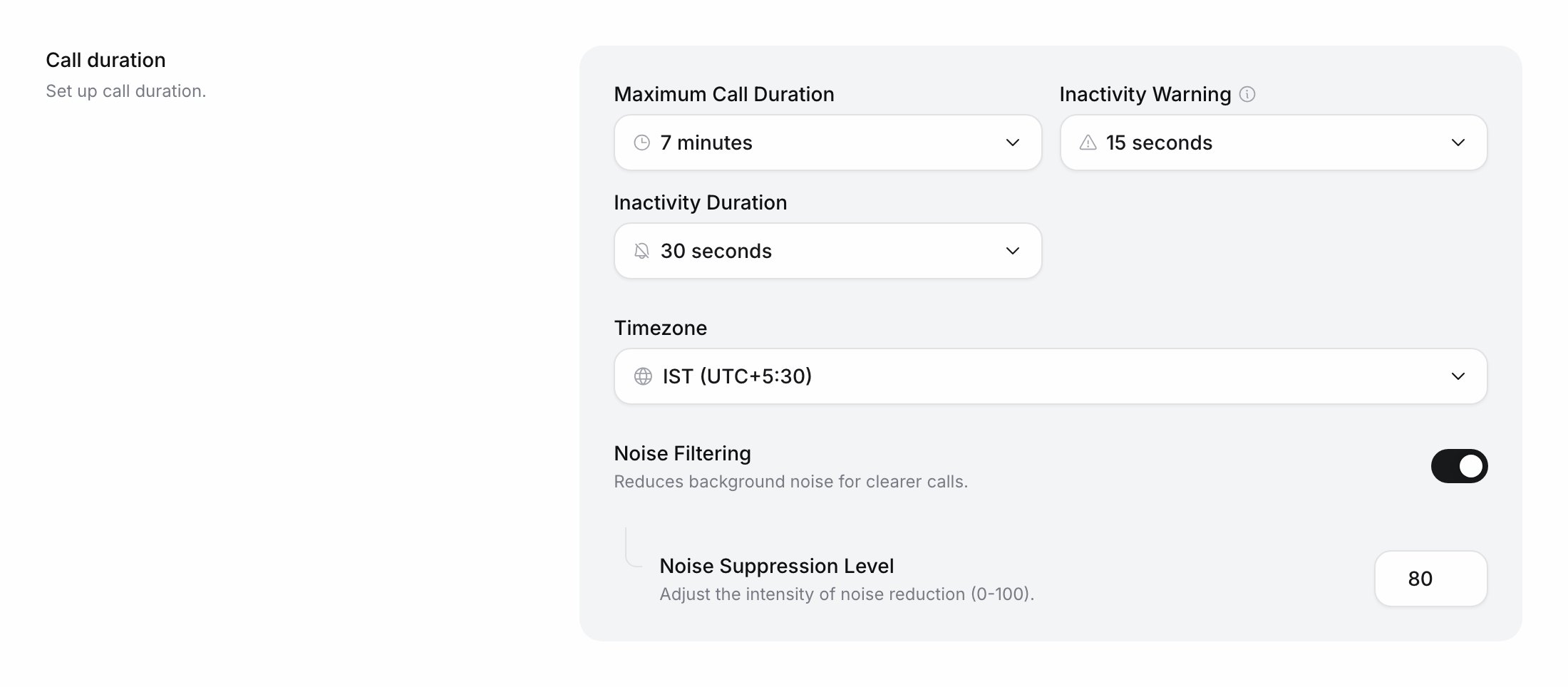
## Call duration
| Control | Values |
| - | - |
| **Maximum Call Duration** | 2 to 20 minutes. The call ends at this length. |
| **Inactivity Warning** | **Off (no warning)**, or 3, 5, 7, 10, 15, 20, 25 or 30 seconds of silence before the agent checks in |
| **Inactivity Duration** | 10 to 60 seconds, in steps of 5. The call ends after this much silence. |
| **Timezone** | The zone the [calling window](#calling-window) is read in. Default IST (UTC+5:30). |
| **Noise Filtering** | On or off. **Noise Suppression Level** (0 to 100, default 80) shows when it is on. |
The menu offers only warnings shorter than the inactivity duration. If you lower the duration to or below the current warning, the warning drops to the highest value still allowed: a 15-second warning with a 15-second duration becomes 10 seconds.
**Timezone** offers IST, EST, CST, MST, PST, GMT, CET (Paris), CET (Berlin), GST, SGT, JST, AEST, NZST and UTC.
## Calling window
The hours an outbound agent may dial, in its **Timezone**. **Call start time** takes whole hours from 00:00 to 23:00; **Call end time** takes a later hour, up to 23:59. 00:00 to 23:59 means no restriction.
An overnight window such as 22:00 to 06:00 can be set only through the [API](#do-this-with-the-api); the dashboard shows it and keeps it.
An individual [API call](/api-reference/endpoint/calling/initiate-individual-call) can send its own `call_time`: each key it sends replaces the agent's value, and keys it leaves out keep the agent's. A [campaign](/documentation/deploy/campaigns/create-a-campaign) always uses its own window instead of the agent's; a campaign started by API without `call_time` calls from 09:00 to 21:00 IST.
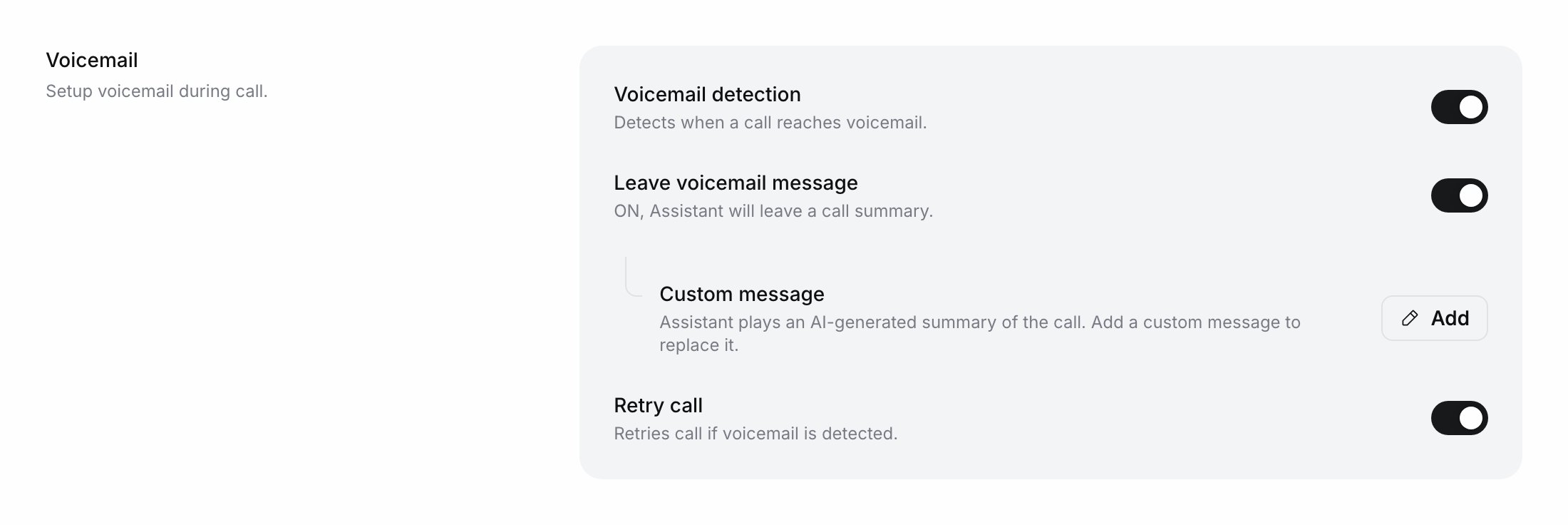
## Voicemail
| Control | Values |
| - | - |
| **Voicemail detection** | On or off |
| **Leave voicemail message** | Off: "Assistant will end the call." On: the agent leaves a summary of the call, or your custom message. |
| **Custom message** | Shown when Leave voicemail message is on. Played word for word instead of the summary; leave it empty to go back to the summary. |
| **Retry call** | On or off: retry the call when voicemail is detected, while the call has retries left |
New single-prompt agents start with **Voicemail detection** and **Retry call** on; new multi-prompt agents start with both off. The agent detects voicemail during the call only while the caller's audio is silenced: during the first message when **Interruptible** is off, or while the agent speaks when **Silence callee when assistant is speaking** is on ([Other settings](#other-settings)).
## Rate limiting (inbound)
Rate limiting stops one caller from calling an [inbound agent](/documentation/inventory/phone-numbers/inbound-agent-number) over and over. Switching on **Enable rate limiting** starts with **Terminate Call** at 3 calls per hour; change the fields, then click **Save**.
| Control | Values |
| - | - |
| **Action** | **Terminate Call** or **Transfer Call** |
| **Max calls per hour** | 1 or more; default 3 |
| **Transfer to** | A phone number; required for Transfer Call |
| **Whitelisted numbers** | Numbers that are never rate-limited |
## Interruption sensitivity
How easily the caller's voice cuts the agent off mid-sentence: this is the agent's voice activity detection (VAD) threshold. Pick **Strict** for noisy lines where background sounds keep stopping the agent, and **Sensitive** if callers feel the agent talks over them.
| Option | Behaviour |
| - | - |
| **Sensitive** | The agent yields as soon as the caller starts speaking. |
| **Default** | Short sounds like "hello" or "hmm" don't cut the agent off. |
| **Strict** | The caller has to keep speaking before the agent stops. |
New agents start on **Default**.
## Other settings
| Control | What it does |
| - | - |
| **Silence callee when assistant is speaking** | Ignores the caller's voice whenever the agent speaks. |
| **Silence callee during assistant's introduction** | Multi-prompt agents only: the same during the first message. On a single-prompt agent this is the **Interruptible** switch next to **First message** ([The Interruptible switch](/documentation/build-agents/customize-agent-behaviour/agent-prompt#the-interruptible-switch)). |
| **Enable background audio** | Plays office ambience under the agent's voice. **Loop Audio** (on by default) repeats it for the whole call; **Volume** goes from 0 to 100 in steps of 10, default 100. |
| **Enable graceful exit warning** | Plays a message shortly before **Maximum Call Duration** is reached, then ends the call. It doesn't play before an inactivity hang-up. **Exit Timing (seconds)** is how long before the end, at least 1, default 12. **Exit Message** takes one line per [agent language](/documentation/build-agents/customize-agent-behaviour/voice-and-language#languages), such as "We're almost out of time, so I'll wrap up now." |
## Chat settings
The **Chat** page shows **Chat Duration** on every agent except WhatsApp agents. WhatsApp agents show **WhatsApp session** instead: see [Set the session timeouts](/documentation/build-agents/agents/whatsapp-agents/create-an-agent#set-the-session-timeouts).
**Chat Duration** applies to every text chat in an [embedded widget](/documentation/deploy/web-and-apps/web-widget/overview) and every [Live chat test](/documentation/build-agents/test-and-improve/test-an-agent#test-options). Voice web calls use the call settings above.
| Control | Values |
| - | - |
| **Maximum call length (seconds)** | 120 to 1,200, in steps of 120 |
| **Idle Timeout Warning (seconds)** | 10 to 60 in steps of 5, then 90 and 120 |
| **Idle Timeout End (seconds)** | 10 to 60 in steps of 5, then 90 and 120 |
## Do this with the API
[Create Agent](/api-reference/endpoint/assistant/create-agent) (`POST /public/agent`) takes these settings in `call_config`. Any key you leave out takes its default. You need an [API key](/documentation/manage-account/api-key).
Calling window: `call_start_time` and `call_end_time` as `HH:MM` (the window may cross midnight), and `timezone` as an IANA zone such as `Asia/Kolkata`.
Seconds, 10 to 3,600.Seconds of silence before the agent checks in. `0` turns it off.Seconds of silence before the call ends. Must be greater than `idle_timeout_warning`.`filter_noise` (default `false`) and `noise_suppression_level` (0 to 100, default 80).`detect` (default `true`), `action` (`end`, `summarise` or `static_message`; default `end`), `retry` (default `true`) and `static_message`, the text spoken when `action` is `static_message`.`audio_id` (`office_ambience`), `volume` (0.0 to 1.0), `mixing` and `loop`. Omit it to keep background audio off.`true` means the caller cannot interrupt the first message.
```bash cURL theme={null}
curl -X POST https://prod-api.ringg.ai/ca/api/v0/public/agent \
-H "X-API-KEY: $RINGG_API_KEY" \
-H "Content-Type: application/json" \
-d '{
"agent_name": "Payment reminder",
"introduction_and_objective": "You are Riya, calling customers of Acme Finance about an upcoming EMI.",
"response_guidelines": "Be polite and brief. Confirm the due date before ending.",
"task": "Remind the customer of their EMI due date and ask when they will pay.",
"primary_language": "en-IN",
"voice_id": "857e1b18-0adb-4b3e-b150-ce7896a16bf1",
"intro_message": "Hello, this is Riya from Acme Finance. Am I speaking with the account holder?",
"agent_type": "outbound",
"call_config": {
"max_call_length": 300,
"idle_timeout_warning": 7,
"idle_timeout_end": 15,
"call_time": { "call_start_time": "10:00", "call_end_time": "19:00", "timezone": "Asia/Kolkata" },
"voicemail": { "detect": true, "action": "end", "retry": true }
}
}'
```
To override settings for one call, send `call_config` (`max_call_length`, `idle_timeout_warning`, `idle_timeout_end`, `call_time`, `call_retry_config`) with [Initiate Individual Call](/api-reference/endpoint/calling/initiate-individual-call). On an existing agent, [Edit Assistant](/api-reference/endpoint/assistant/edit-assistant) changes these:
| Operation | Sets |
| - | - |
| `edit_chat_settings` | `chat_settings.whatsapp_session` (`idle_timeout_minutes` 5 to 1,440, `max_duration_minutes` 60 to 10,080) |
| `edit_vad_settings` | **Interruption sensitivity**: `vad_settings.interruption_sensitivity` is `default`, `sensitive` or `strict` |
| `edit_noise_settings` | The two silence switches: `mute_during_intro` and `mute_while_bot_speaking`, both required |
Other call settings on an existing agent are changed in the dashboard.
## Verify it worked
[Test the agent](/documentation/build-agents/test-and-improve/test-an-agent) with a phone call and stay silent. The agent should check in at the **Inactivity Warning** time and hang up at the **Inactivity Duration**. Open the call in [Logs](/documentation/monitor/logs#the-call-panel) to check its duration and how it ended.
## Troubleshooting
Background noise or short sounds on the caller's side are being heard as speech. Set [Interruption sensitivity](#interruption-sensitivity) to **Strict**; if callers still can't be heard over the agent, switch on **Silence callee when assistant is speaking** under [Other settings](#other-settings). To stop interruptions during the greeting only, turn off the first message's **Interruptible** switch ([Prompt](/documentation/build-agents/customize-agent-behaviour/agent-prompt#the-interruptible-switch)).
Check the calling window and the **Timezone** it is read in. Outside the window an outbound call is not dialled immediately. A campaign's calls follow the [campaign's calling window](/documentation/deploy/campaigns/create-a-campaign), not the agent's.
## Next steps
Define the variables Ringg fills in from every conversation.
Call a list with its own calling hours.
This documentation is built and hosted on [Mintlify](https://mintlify.com), a developer documentation platform.
 ## Calling window
The hours an outbound agent may dial, in its **Timezone**. **Call start time** takes whole hours from 00:00 to 23:00; **Call end time** takes a later hour, up to 23:59. 00:00 to 23:59 means no restriction.
An overnight window such as 22:00 to 06:00 can be set only through the [API](#do-this-with-the-api); the dashboard shows it and keeps it.
An individual [API call](/api-reference/endpoint/calling/initiate-individual-call) can send its own `call_time`: each key it sends replaces the agent's value, and keys it leaves out keep the agent's. A [campaign](/documentation/deploy/campaigns/create-a-campaign) always uses its own window instead of the agent's; a campaign started by API without `call_time` calls from 09:00 to 21:00 IST.
## Voicemail
| Control | Values |
| - | - |
| **Voicemail detection** | On or off |
| **Leave voicemail message** | Off: "Assistant will end the call." On: the agent leaves a summary of the call, or your custom message. |
| **Custom message** | Shown when Leave voicemail message is on. Played word for word instead of the summary; leave it empty to go back to the summary. |
| **Retry call** | On or off: retry the call when voicemail is detected, while the call has retries left |
New single-prompt agents start with **Voicemail detection** and **Retry call** on; new multi-prompt agents start with both off. The agent detects voicemail during the call only while the caller's audio is silenced: during the first message when **Interruptible** is off, or while the agent speaks when **Silence callee when assistant is speaking** is on ([Other settings](#other-settings)).
## Calling window
The hours an outbound agent may dial, in its **Timezone**. **Call start time** takes whole hours from 00:00 to 23:00; **Call end time** takes a later hour, up to 23:59. 00:00 to 23:59 means no restriction.
An overnight window such as 22:00 to 06:00 can be set only through the [API](#do-this-with-the-api); the dashboard shows it and keeps it.
An individual [API call](/api-reference/endpoint/calling/initiate-individual-call) can send its own `call_time`: each key it sends replaces the agent's value, and keys it leaves out keep the agent's. A [campaign](/documentation/deploy/campaigns/create-a-campaign) always uses its own window instead of the agent's; a campaign started by API without `call_time` calls from 09:00 to 21:00 IST.
## Voicemail
| Control | Values |
| - | - |
| **Voicemail detection** | On or off |
| **Leave voicemail message** | Off: "Assistant will end the call." On: the agent leaves a summary of the call, or your custom message. |
| **Custom message** | Shown when Leave voicemail message is on. Played word for word instead of the summary; leave it empty to go back to the summary. |
| **Retry call** | On or off: retry the call when voicemail is detected, while the call has retries left |
New single-prompt agents start with **Voicemail detection** and **Retry call** on; new multi-prompt agents start with both off. The agent detects voicemail during the call only while the caller's audio is silenced: during the first message when **Interruptible** is off, or while the agent speaks when **Silence callee when assistant is speaking** is on ([Other settings](#other-settings)).
 ## Rate limiting (inbound)
Rate limiting stops one caller from calling an [inbound agent](/documentation/inventory/phone-numbers/inbound-agent-number) over and over. Switching on **Enable rate limiting** starts with **Terminate Call** at 3 calls per hour; change the fields, then click **Save**.
| Control | Values |
| - | - |
| **Action** | **Terminate Call** or **Transfer Call** |
| **Max calls per hour** | 1 or more; default 3 |
| **Transfer to** | A phone number; required for Transfer Call |
| **Whitelisted numbers** | Numbers that are never rate-limited |
## Interruption sensitivity
How easily the caller's voice cuts the agent off mid-sentence: this is the agent's voice activity detection (
## Rate limiting (inbound)
Rate limiting stops one caller from calling an [inbound agent](/documentation/inventory/phone-numbers/inbound-agent-number) over and over. Switching on **Enable rate limiting** starts with **Terminate Call** at 3 calls per hour; change the fields, then click **Save**.
| Control | Values |
| - | - |
| **Action** | **Terminate Call** or **Transfer Call** |
| **Max calls per hour** | 1 or more; default 3 |
| **Transfer to** | A phone number; required for Transfer Call |
| **Whitelisted numbers** | Numbers that are never rate-limited |
## Interruption sensitivity
How easily the caller's voice cuts the agent off mid-sentence: this is the agent's voice activity detection (