> ## Documentation Index
> Fetch the complete documentation index at: https://docs.ringg.ai/llms.txt
> Use this file to discover all available pages before exploring further.
> ## Agent Instructions
> To search or read these docs, connect the Ringg docs MCP server at https://docs.ringg.ai/mcp (no key needed; tools search_ringg_ai and query_docs_filesystem_ringg_ai) instead of browsing pages one by one. Setup for each client: https://docs.ringg.ai/resources/mcp-server/docs-mcp-server/mcp-for-ai-assistants.md
> The dashboard labels agents "Assistants"; these docs say "agent". Both mean the same object, identified by agent_id.
> API base URL: https://prod-api.ringg.ai/ca/api/v0. Send the workspace API key in the X-API-KEY header, from server-side code only.
> Placing a call dials a real phone number and spends credits. Confirm the number with the user before calling.
> To act on a Ringg workspace (place calls, edit agents, read transcripts), use the separate Ringg workspace MCP server at https://mcp.ringg.ai/mcp: https://docs.ringg.ai/resources/mcp-server/workspace-mcp-server/overview.md
# Multi-prompt global settings
> Settings that apply to a whole Ringg AI multi-prompt agent: voice, number, variables, knowledge base, analysis, call and chat settings, events, and pre- and post-call tools.
## Global Settings
With no node selected, the right panel shows **Global Settings**, which apply to the whole agent:
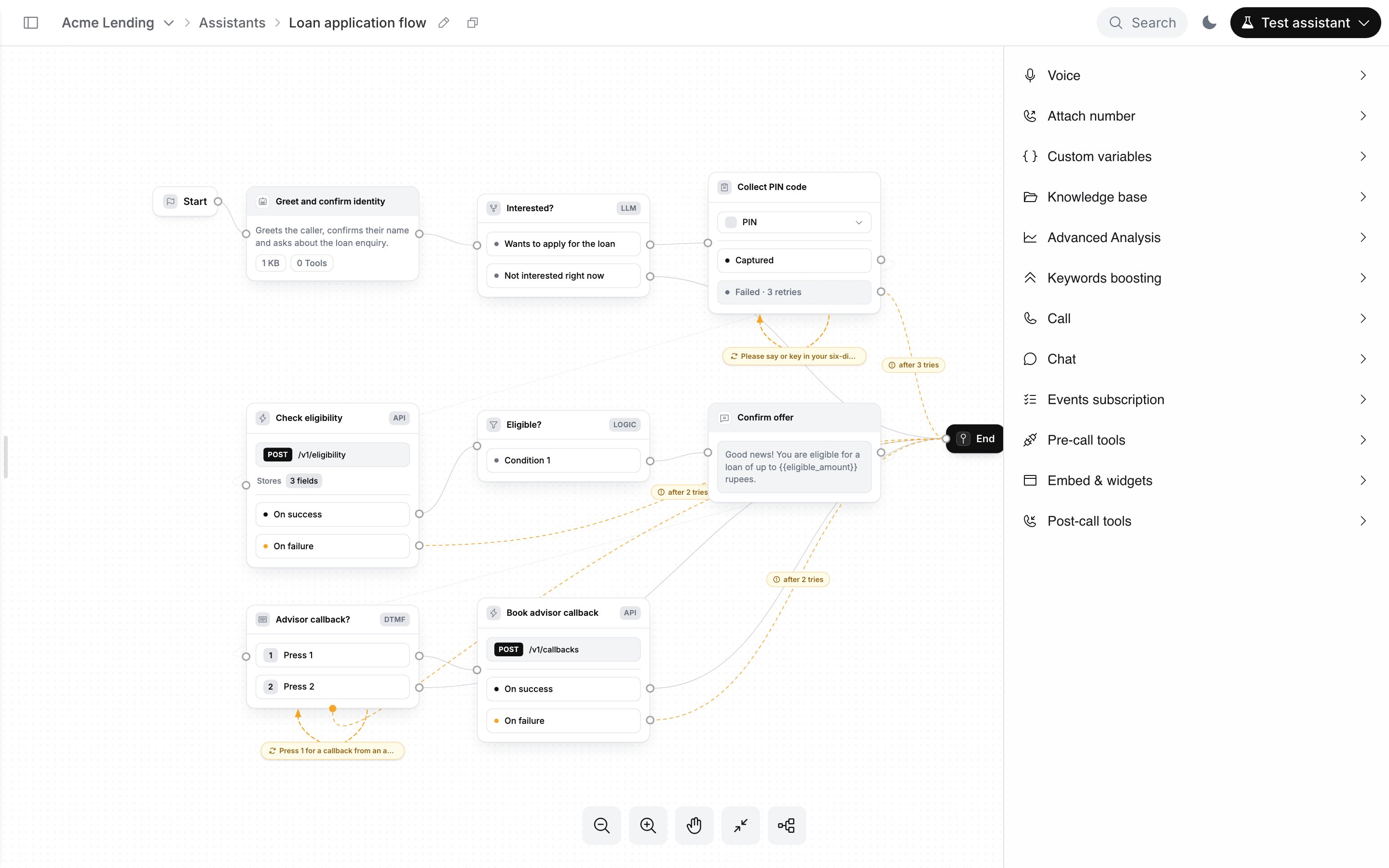 | Item | Covers |
| - | - |
| [**Voice**](/documentation/build-agents/customize-agent-behaviour/voice-and-language) | Default language, voice and speed |
| [**Attach number**](/documentation/inventory/phone-numbers/inbound-agent-number) | Inbound number for the agent |
| [**Custom variables**](/documentation/build-agents/customize-agent-behaviour/custom-variables) | Variables passed in per call |
| [**Knowledge base**](/documentation/build-agents/customize-agent-behaviour/attach-a-knowledge-base) | Agent-wide knowledge bases |
| [**Advanced Analysis**](/documentation/build-agents/customize-agent-behaviour/advanced-analysis) | Post-call extraction |
| **Keywords boosting** | Words the speech recogniser should favour |
| [**Call**](/documentation/build-agents/customize-agent-behaviour/call-settings) | Call duration, voicemail, interruption and other call settings |
| [**Chat**](/documentation/build-agents/customize-agent-behaviour/call-settings) | Duration settings for text sessions |
| [**Events subscription**](/documentation/build-agents/customize-agent-behaviour/event-subscription) | Webhooks for call events |
| [**Pre-call tools**](/documentation/build-agents/customize-agent-behaviour/tools/overview) | Tools that run before the call |
| [**Embed & widgets**](/documentation/deploy/web-and-apps/web-widget/overview) | Web widget, its components and install code |
| [**Post-call tools**](/documentation/build-agents/customize-agent-behaviour/tools/overview) | Tools that run after the call |
On-call tools are not in Global Settings: you attach them per Agent node.
This documentation is built and hosted on [Mintlify](https://mintlify.com), a developer documentation platform.
| Item | Covers |
| - | - |
| [**Voice**](/documentation/build-agents/customize-agent-behaviour/voice-and-language) | Default language, voice and speed |
| [**Attach number**](/documentation/inventory/phone-numbers/inbound-agent-number) | Inbound number for the agent |
| [**Custom variables**](/documentation/build-agents/customize-agent-behaviour/custom-variables) | Variables passed in per call |
| [**Knowledge base**](/documentation/build-agents/customize-agent-behaviour/attach-a-knowledge-base) | Agent-wide knowledge bases |
| [**Advanced Analysis**](/documentation/build-agents/customize-agent-behaviour/advanced-analysis) | Post-call extraction |
| **Keywords boosting** | Words the speech recogniser should favour |
| [**Call**](/documentation/build-agents/customize-agent-behaviour/call-settings) | Call duration, voicemail, interruption and other call settings |
| [**Chat**](/documentation/build-agents/customize-agent-behaviour/call-settings) | Duration settings for text sessions |
| [**Events subscription**](/documentation/build-agents/customize-agent-behaviour/event-subscription) | Webhooks for call events |
| [**Pre-call tools**](/documentation/build-agents/customize-agent-behaviour/tools/overview) | Tools that run before the call |
| [**Embed & widgets**](/documentation/deploy/web-and-apps/web-widget/overview) | Web widget, its components and install code |
| [**Post-call tools**](/documentation/build-agents/customize-agent-behaviour/tools/overview) | Tools that run after the call |
On-call tools are not in Global Settings: you attach them per Agent node.
This documentation is built and hosted on [Mintlify](https://mintlify.com), a developer documentation platform.