> ## Documentation Index
> Fetch the complete documentation index at: https://docs.ringg.ai/llms.txt
> Use this file to discover all available pages before exploring further.
# Authentication
> Authenticate Ringg AI API requests with workspace API keys and keep keys secure in production.
Ringg API requests use a workspace API key in the `X-API-KEY` header.
Treat the API key as a server-side secret. Do not include it in browser JavaScript, mobile app bundles, public repositories, screenshots, logs, or support tickets.
## Get your API key
1. Log in to the [Ringg AI dashboard](https://www.ringg.ai/dashboard/api).
2. Open **API** from the dashboard sidebar.
3. Copy the workspace API key, or regenerate it if you intentionally want to rotate the key.
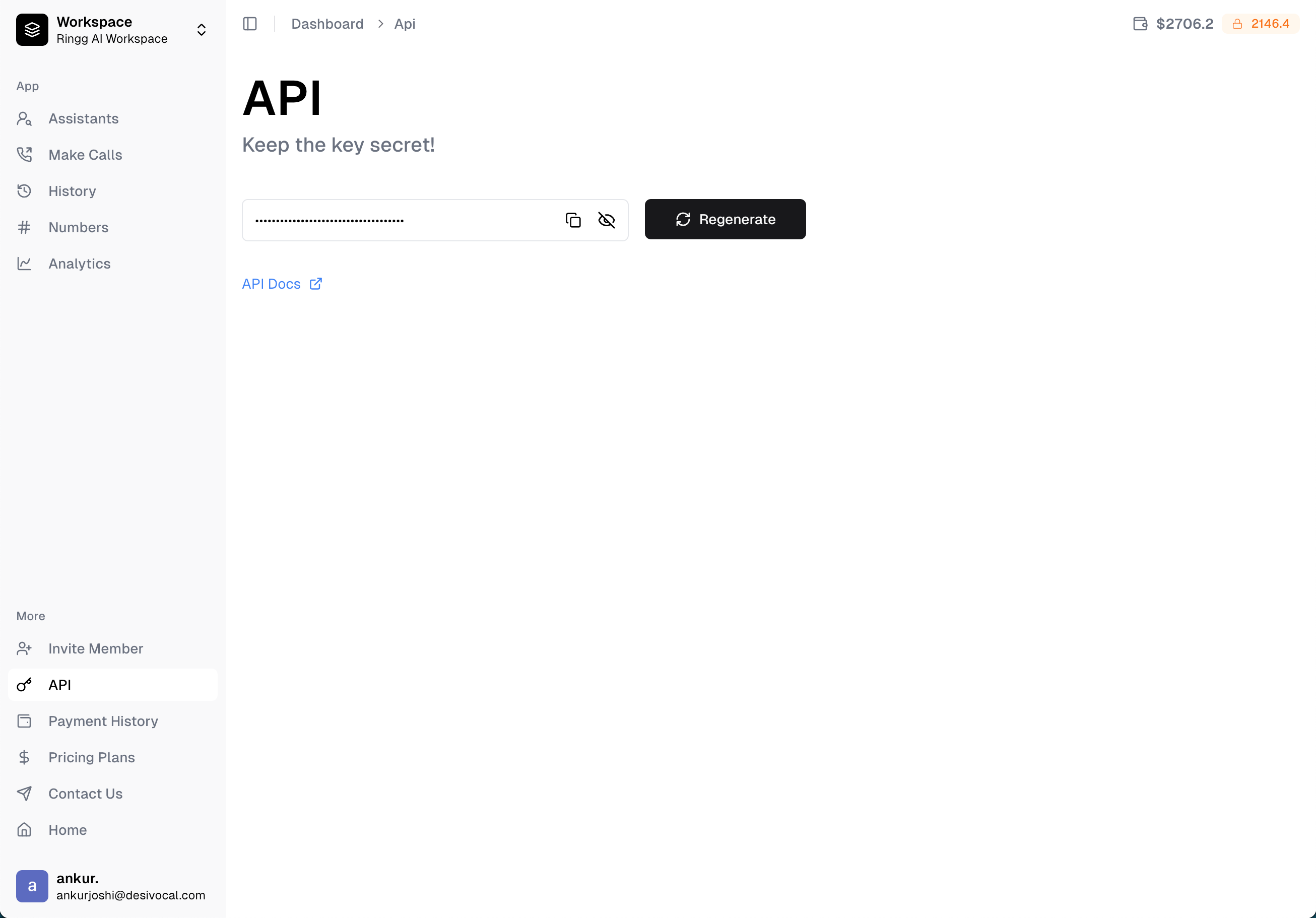 Regenerating an API key immediately invalidates the previous key. Update every backend service that uses the old key before relying on the new one.
## Send the API key
```bash theme={null}
curl --request GET "https://prod-api.ringg.ai/ca/api/v0/workspace" \
--header "X-API-KEY: $RINGG_API_KEY"
```
```javascript theme={null}
const response = await fetch("https://prod-api.ringg.ai/ca/api/v0/workspace", {
headers: {
"X-API-KEY": process.env.RINGG_API_KEY
}
});
if (!response.ok) {
throw new Error(`Ringg API error: ${response.status} ${await response.text()}`);
}
const workspace = await response.json();
```
## Successful response
`GET /workspace` is the simplest authentication check.
```json theme={null}
{
"workspace_info": {
"id": "7251cb4b-72a3-42dc-9586-edf0328e2973",
"name": "Acme Support Workspace",
"created_at": "2026-04-15T10:30:00.000000+00:00",
"credits": 3025.0,
"locked_credits": 0.0,
"api_key": "redacted-api-key"
}
}
```
## Production practices
* Store the key in a secret manager or environment variable.
* Use one backend service as the integration boundary when possible.
* Rotate the key if you suspect it's been exposed.
* Avoid logging request headers.
* Alert on unexpected usage volume or repeated `401` responses.
* Use HTTPS for every API call.
## Troubleshooting
| Response | Meaning | Fix |
| ----------------------- | ------------------------------------------------- | ------------------------------------------------------- |
| `401 Unauthorized` | Missing, invalid, or rotated API key | Verify `X-API-KEY` and redeploy secrets |
| `403 Forbidden` | Key is valid but lacks permission for that action | Check workspace role and API permissions |
| `429 Too Many Requests` | Rate limit exceeded | Back off and retry later |
| `5xx` | Ringg server or upstream provider issue | Retry with backoff and log `call_id` or request context |
## Next steps
Use the key to make your first call.
Rotate a workspace key intentionally.
Regenerating an API key immediately invalidates the previous key. Update every backend service that uses the old key before relying on the new one.
## Send the API key
```bash theme={null}
curl --request GET "https://prod-api.ringg.ai/ca/api/v0/workspace" \
--header "X-API-KEY: $RINGG_API_KEY"
```
```javascript theme={null}
const response = await fetch("https://prod-api.ringg.ai/ca/api/v0/workspace", {
headers: {
"X-API-KEY": process.env.RINGG_API_KEY
}
});
if (!response.ok) {
throw new Error(`Ringg API error: ${response.status} ${await response.text()}`);
}
const workspace = await response.json();
```
## Successful response
`GET /workspace` is the simplest authentication check.
```json theme={null}
{
"workspace_info": {
"id": "7251cb4b-72a3-42dc-9586-edf0328e2973",
"name": "Acme Support Workspace",
"created_at": "2026-04-15T10:30:00.000000+00:00",
"credits": 3025.0,
"locked_credits": 0.0,
"api_key": "redacted-api-key"
}
}
```
## Production practices
* Store the key in a secret manager or environment variable.
* Use one backend service as the integration boundary when possible.
* Rotate the key if you suspect it's been exposed.
* Avoid logging request headers.
* Alert on unexpected usage volume or repeated `401` responses.
* Use HTTPS for every API call.
## Troubleshooting
| Response | Meaning | Fix |
| ----------------------- | ------------------------------------------------- | ------------------------------------------------------- |
| `401 Unauthorized` | Missing, invalid, or rotated API key | Verify `X-API-KEY` and redeploy secrets |
| `403 Forbidden` | Key is valid but lacks permission for that action | Check workspace role and API permissions |
| `429 Too Many Requests` | Rate limit exceeded | Back off and retry later |
| `5xx` | Ringg server or upstream provider issue | Retry with backoff and log `call_id` or request context |
## Next steps
Use the key to make your first call.
Rotate a workspace key intentionally.